


Our verdict
Blocksy's free version gives you a real header builder and 32 starter sites while staying close to Twenty Twenty-Five in speed, but starter sites add weight and the best extras are Pro only.
- The free version includes the drag-and-drop header and footer builder, transparent and sticky headers.
- 32 of its 45 starter sites are free, and our import finished in about 2 minutes.
- Without a starter site it stayed close to Twenty Twenty-Five: Lighthouse 94 vs 96 on our test page.
- The Business starter site cut the home page Lighthouse score from 90 to 63 and added 2 plugins.
- Many popular features are Pro only: dark mode, mega menu, hooks, popups and conditional headers.
- WooCommerce extras such as quick view and swatches need the Business plan ($99 a year) or higher.
At a glance
- Developer
- Creative Themes
- Category
- Multipurpose, Themes
- Theme kind
- Hybrid theme
- Design range
- 45 (32 free) starter sites, 12 patterns, 0 style variations
- Page builders
- Block editor, Elementor, Brizy (starter sites)
- WooCommerce ready
- Yes
- Accessibility-ready
- Yes
- Lifetime price
- $199 lifetime
- Version tested / latest
- 2.1.62 / 2.1.62
- Last updated
- November 13, 2026
- Active installs
- 300,000+
- WP.org rating
- 5.0/5 (874)
- Requirements
- WordPress 6.7 or later, PHP 7.0 or later
- Tested up to
- 7.1
- First released
- May 10, 2019
- Free version
- Yes
- Pro from
- $69/year
- Refund policy
- 14-day money-back guarantee (creativethemes.com/blocksy/pricing, checked 15 Nov 2026).
- Security
- Theme: WPScan lists 12 vulnerabilities (Feb 2024 to Jun 2026), all fixed; the latest, a Contributor+ PHP object injection (CVSS 7.2), was fixed in 2.1.42. Patchstack lists 14, 0 unpatched. Blocksy Companion: Patchstack lists 18 fixed issues, including an unauthenticated arbitrary file upload (<= 2.1.46, Jul 2026) and an unauthenticated privilege escalation (<= 2.1.58, Oct 2026). Checked 15 Nov 2026.
By Sophia Bennett, Theme Reviewer. Tested 15 November 2026 on Blocksy 2.1.62 in the WPScorix Lab. Disclosure: WPScorix may earn a commission if you buy through our links. It never changes our scores.
What Blocksy is and who it is for
Blocksy is a free WordPress theme by Creative Themes. It is a hybrid theme: a classic theme that you set up in the Customizer, with a theme.json file so blocks pick up its colours and fonts. It does not use the Site Editor, so you will not find block templates or style variations.
Most of the work happens in the Customizer and in the free Blocksy Companion plugin, which adds the starter sites, extensions and theme blocks. Blocksy has over 300,000 active installs and a 5/5 rating from 874 reviews on WordPress.org.
Blocksy suits blogs, business sites and small shops that want a visual header builder without a page builder. Skip it if you want to design everything in the Site Editor, or if you need a mega menu or dark mode but will not pay for Pro.
How we tested
We installed Blocksy 2.1.62 and Blocksy Companion 2.1.62 on the WPScorix Lab (WordPress 7.1.4, PHP 8.3.30). Our baseline is Twenty Twenty-Five with no plugins. We measured the same three pages with the theme clean and again after importing the free Business starter site for the block editor.
Each number is the median of 3 runs. Lighthouse runs on its simulated mobile setting. We then switched back to Twenty Twenty-Five, recorded what stayed behind and reset the lab. We used the free version only and bought nothing. Read more about how we review.
Blocksy design and templates
Feature check
| Feature | Free | Pro | Our result |
|---|---|---|---|
| Drag-and-drop header builder | ✓ | ✓ | Works |
| Separate tablet and mobile header | ✓ | ✓ | Works |
| Drag-and-drop footer builder | ✓ | ✓ | Works |
| Starter site import (32 free) | ✓ | ✓ | Works |
| Block patterns (12) | ✓ | ✓ | Works |
| Style variations and block templates | ✗ | ✗ | Not supported |
| Dark mode switch | ✗ | ✓ | Pro only |
| Mega menu | ✗ | ✓ | Pro only |
| Content hooks and popups | ✗ | ✓ | Pro only |
| Conditional headers and footers | ✗ | ✓ | Pro only |
| WooCommerce extras (quick view, swatches, wishlist) | ✗ | ✓ | Pro only |
Blocksy gives you three ways to design: starter sites, block patterns and the Customizer. Most of it works in the free version.
Starter sites
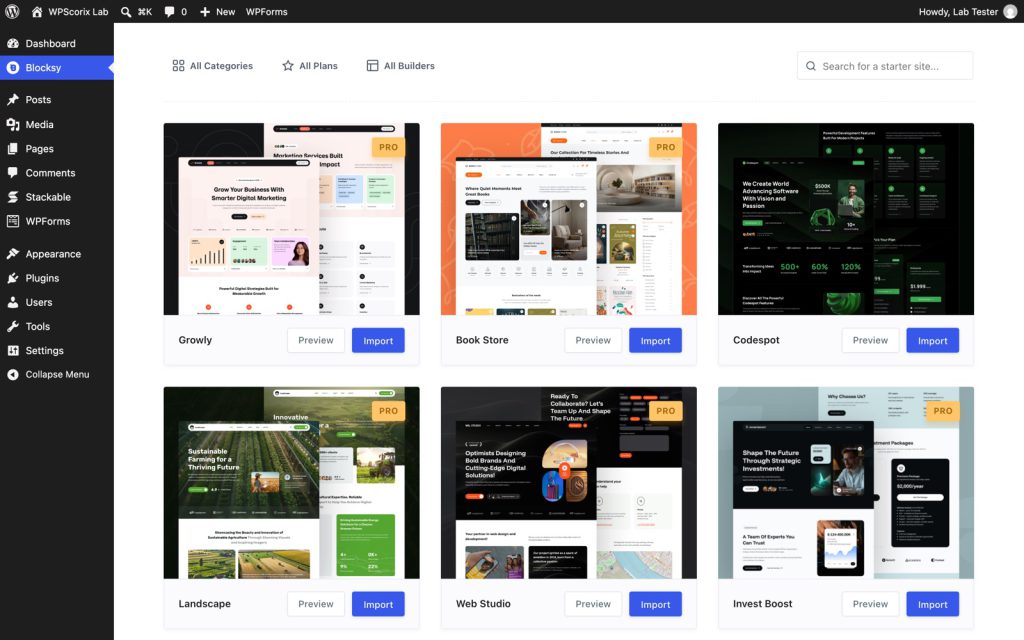
The starter site library listed 45 sites in our test, and 32 of them were free. All free sites come for the block editor, all but one also for Elementor, and 7 also for Brizy. Pro sites carry a PRO badge and open an upgrade message instead of the importer.
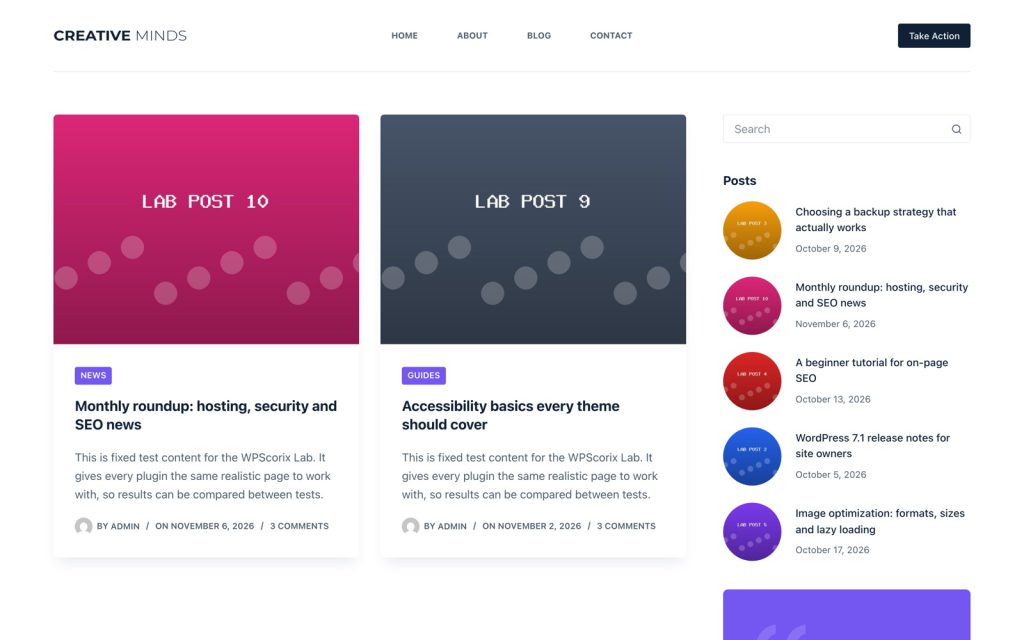
We imported the free Business starter site. The wizard asked for a page builder, the parts to import and two plugins: Stackable and WPForms. It finished in about 2 minutes and added 5 pages, 6 posts, 43 images, a contact form and a static home page.
Patterns and style variations
Blocksy registers 12 block patterns of its own. It has no style variations and no block templates, because it is not a block theme. You change colours and fonts globally in the Customizer, with a global colour palette and Google Fonts in the free version.
Headers and footers
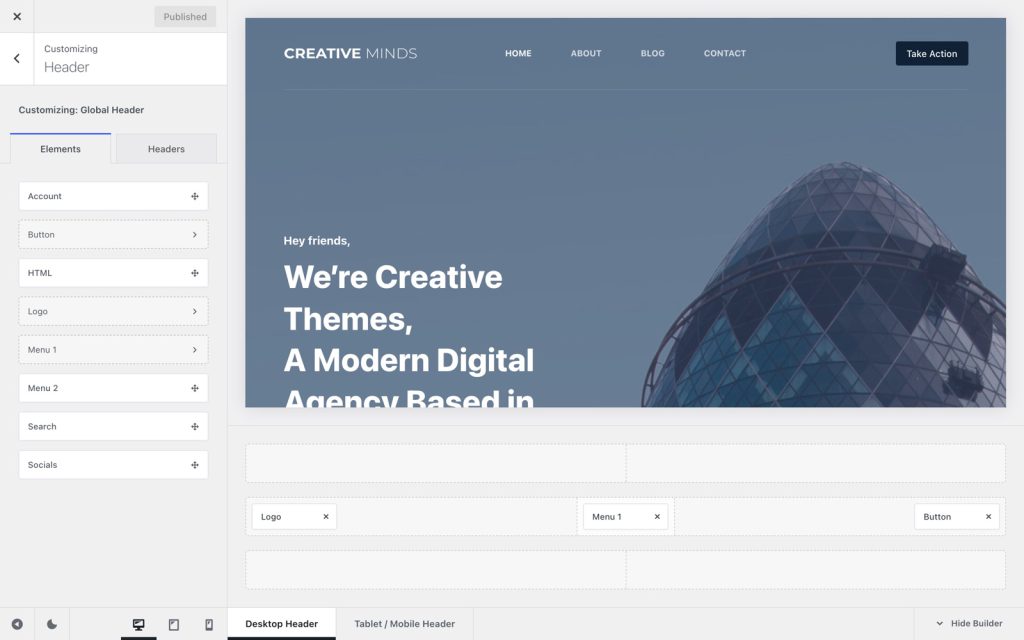
The header builder is the highlight. You drag elements such as the logo, menus, button, search, account and social icons into three rows, with a separate layout for tablet and mobile. The footer builder works the same way. Transparent and sticky headers are free; conditional headers, extra elements and the mega menu need Pro.
Customization and ease of use
All design settings live in the Customizer, grouped into General, Header, Footer, Sidebar, Colours, Typography and Performance, then per post type. The live preview updates as you change options, which makes it easy to see what each setting does.
Blocksy’s own dashboard links to the main Customizer sections, the starter sites, extensions and the changelog. We saw no Blocksy notices on the WordPress dashboard. The Customizer has a View Pro Features button, and Pro starter sites are clearly marked.
The plugins from the starter site were noisier. After the import, WPForms took over the next admin page with its own welcome screen, and Stackable opened a welcome pop-up in the Customizer. When our first import attempt was interrupted, the importer offered to Remove or Reinstall the site, and Reinstall worked.
Blocksy screenshots


Blocksy performance
Performance results
| Metric | Twenty Twenty-Five | Blocksy clean | With starter site | Difference |
|---|---|---|---|---|
| Lighthouse score, test page (mobile) | 96 /100 | 94 /100 | 90 /100 | −2 /100 (−2.1%) |
| Largest Contentful Paint, test page | 2.31 s | 2.41 s | 2.80 s | +0.10 s (+4.3%) |
| Cumulative Layout Shift, test page | 0 | 0 | 0 | No change |
| Page weight, test page | 232.30 KB | 219.10 KB | 264.80 KB | −13.20 KB (−5.7%) |
| CSS/JS files, test page | 4 | 3 | 7 | −1 (−25.0%) |
| Database queries, test page | 21 | 23 | 59 | +2 (+9.5%) |
| Peak PHP memory, test page | 40 MB | 42.50 MB | 64.50 MB | +2.50 MB (+6.3%) |
| Time to first byte, test page | 1,457 ms | 1,479 ms | 2,836 ms | +22 ms (+1.5%) |
| Lighthouse score, home page (mobile) | 96 /100 | 90 /100 | 63 /100 | −6 /100 (−6.3%) |
| Page weight, home page | 333.40 KB | 326.20 KB | 1,080.90 KB | −7.20 KB (−2.2%) |
The table compares Twenty Twenty-Five, Blocksy clean and Blocksy with the Business starter site on our lab test page and home page. Clean, Blocksy stayed close to the baseline: Lighthouse 94 against 96, with one fewer CSS/JS file and a lighter page. Server work rose slightly: 2 more database queries and 2.5 MB more PHP memory.
The starter site changed the picture. Its home page weighed 1,081 KB and scored 63 in Lighthouse, with a 6.2 s LCP on simulated mobile. On the test page, queries rose from 23 to 59 and memory to 64.5 MB. Part of that comes from Stackable and WPForms, not from Blocksy itself. Remove plugins you do not use after an import.
Compatibility, accessibility and security
Blocksy requires WordPress 6.7 and PHP 7.0, and it is tested up to WordPress 7.1. We saw no PHP errors from the theme on PHP 8.3.30. It carries the accessibility-ready tag on WordPress.org, and our pages had a skip link. We did not run a full keyboard or contrast audit, and we did not test WooCommerce, Elementor or Brizy.
Switching back to Twenty Twenty-Five was clean for your content. Our switching test found no orphaned shortcodes, theme blocks or post types. Blocksy left its settings and 5 inactive widgets behind. WPForms, installed by the starter site, left 11 tables until we deleted it.
Security needs attention. WPScan lists 12 vulnerabilities in the theme between February 2024 and June 2026, all fixed; most were stored cross-site scripting that needed a Contributor account. Patchstack lists 18 fixed issues in Blocksy Companion, including an unauthenticated file upload and a privilege escalation in 2026. None was unpatched when we checked.
Support and documentation
This section is based on community data, not our own support test. The WordPress.org forum had about 10 threads in the 2 months before our test. Most last replies came from Creative Themes staff, usually within days to a few weeks. Recent threads often asked about WooCommerce layouts after version 2.1.50.
Creative Themes publishes documentation for each Customizer area and links to it from the Blocksy dashboard. Paid plans include one year of support, or lifetime support with a lifetime licence, according to the pricing page.
Pros and cons
Based on our test of Blocksy 2.1.62 in the WPScorix Lab on 15 November 2026.
Pros
- The free version includes the drag-and-drop header and footer builder, transparent and sticky headers.
- 32 of its 45 starter sites are free, and our import finished in about 2 minutes.
- Without a starter site it stayed close to Twenty Twenty-Five: Lighthouse 94 vs 96 on our test page.
- No content lock-in: switching back to Twenty Twenty-Five left no orphaned shortcodes, blocks or post types.
- Actively maintained: version 2.1.62 was released on 13 November 2026, two days before our test.
Cons
- The Business starter site cut the home page Lighthouse score from 90 to 63 and added 2 plugins.
- Many popular features are Pro only: dark mode, mega menu, hooks, popups and conditional headers.
- WooCommerce extras such as quick view and swatches need the Business plan ($99 a year) or higher.
- Blocksy Companion had 18 vulnerabilities fixed, including 2 unauthenticated ones in 2026, so updates matter.
Blocksy pricing
Blocksy pricing (checked 15 Nov 2026, USD)
| Plan | Price | What you get | |
|---|---|---|---|
Blocksy (free) | $0 | Header and footer builder, 32 free starter sites, blog and basic WooCommerce options | Download free |
| $69 / year or $199 lifetime, 1 site | All Pro starter sites, hooks, popups, mega menu, dark mode, custom fonts | See plans | |
Business | $99 / year or $299 lifetime, 10 sites | Personal plus WooCommerce extras (quick view, swatches, wishlist) and post filters | See plans |
Agency | $149 / year or $499 lifetime, unlimited sites | Business plus white label | See plans |
The free theme is enough for many sites: you get the header and footer builder, 32 starter sites and the core blog options. Pro starts at $69 a year for 1 site, or $199 once for a lifetime licence. Business ($99 a year, 10 sites) is the plan for WooCommerce stores, because the shop extras start there.
Creative Themes offers a 14-day money-back guarantee. The pricing page does not mention a renewal discount, so plan for the full yearly price. If you will keep the site for more than 3 years, the lifetime licence costs less overall.
Score breakdown
- Design & Templates: 4.0/5. 32 free starter sites, a strong header and footer builder and 12 patterns; no style variations or block templates.
- Customization: 4.0/5. A clear Customizer with live preview; conditional layouts, hooks and the mega menu are Pro only.
- Performance: 3.5/5. Close to Twenty Twenty-Five when clean; the Business starter site pushed the home page to Lighthouse 63.
- Ease of use: 4.0/5. A 4-step importer that finished in about 2 minutes; the starter site’s plugins added welcome screens.
- Support: 3.5/5. Active staff replies on WordPress.org and good docs; based on community data, not our own support test.
- Pricing & value: 4.0/5. A generous free version, fair yearly prices and a lifetime option; shop extras need the Business plan.
- Security & Maintenance: 3.0/5. Updated 2 days before our test; many fixed vulnerabilities in the theme and Companion.
No score cap applies: there is no known unpatched vulnerability, the theme was updated in the last 12 months, and the switching test showed no content lock-in.
Blocksy alternatives
Top alternatives
| Theme | WPScorix score | WordPress.org data (15 Nov 2026) | |
|---|---|---|---|
| Not reviewed yet | 1M+ installs, rated 4.9/5 from 6,558 reviews | View | |
| Not reviewed yet | 500,000+ installs, rated 4.9/5 from 458 reviews | View | |
| Not reviewed yet | 500,000+ installs, rated 4.9/5 from 1,428 reviews | View | |
| Not reviewed yet | 200,000+ installs, rated 4.7/5 from 1,284 reviews | View |
Choose Astra if you want the largest ecosystem of starter templates. Kadence and GeneratePress are worth a look if you want a lighter base theme with a similar header builder. Neve suits simple sites built with the block editor. We have not reviewed these themes yet.
Blocksy FAQ
Is Blocksy free?
Is Blocksy Pro worth it?
Is Blocksy fast?
Does Blocksy work with Elementor and WooCommerce?
What happens if I switch away from Blocksy?
Is Blocksy safe to use?
Bottom line: should you use Blocksy?
Blocksy scores 3.8 out of 5 in our test. The free version is generous: a drag-and-drop header and footer builder, 32 free starter sites and 12 patterns. Without a starter site it stayed close to Twenty Twenty-Five, with a Lighthouse score of 94 against 96 on our test page. The free Business starter site imported in about 2 minutes but cut the home page score to 63 and added two plugins, so remove what you do not need. Switching away left no content lock-in. Pro starts at $69 a year or $199 lifetime and adds hooks, popups, a mega menu and dark mode; shops need the Business plan for WooCommerce extras. Keep the theme and Blocksy Companion updated, because both have had many security fixes.
Review history
- Full lab test of Blocksy 2.1.62 with the free Business starter site, Lighthouse measurements and a switching test. Replaces our earlier Blocksy review.
Community Reviews
No reviews yet! Be the first to add a review.