


Our verdict
The SEO Framework is a light, ad-free SEO plugin that works from defaults, but the free version has no redirect manager or content analysis.
- No ads, banners or upgrade pop-ups on the admin screens we visited.
- Added no CSS or JavaScript files and no database queries to our lab test page.
- Worked from defaults with no setup wizard: nothing to configure to get a working plugin.
- No redirect manager: only a per-post 301 field, so bulk redirects need another plugin.
- No readability analysis, and keyword guidance needs the paid Focus extension.
- Left 5 options behind after uninstall, including its site settings.
At a glance
- Developer
- CyberWire B.V.
- Category
- Plugins, SEO Plugin
- Version tested / latest
- 5.2.3 / 5.2.3
- Last updated
- November 25, 2026
- Active installs
- 200,000+
- WP.org rating
- 4.9/5 (382)
- Requirements
- WordPress 7.0 or later, PHP 7.4 or later
- Tested up to
- 7.1.5
- Support resolved (2 months)
- 11 of 14
- First released
- May 29, 2015
- Free version
- Yes
- Pro from
- $324/year
- Refund policy
- Full refund of your last transaction within 30 days of purchase or renewal (theseoframework.com/pricing, checked 27 Nov 2026).
- Security
- WPScan lists 0 vulnerabilities for the plugin (wpscan.com/plugin/autodescription, page last updated 5 May 2025; checked 27 Nov 2026). No Patchstack entry found.
By Alex Miller, Plugin Reviewer. Tested 27 November 2026 on The SEO Framework 5.2.3 in the WPScorix Lab. Disclosure: WPScorix may earn a commission if you buy through our links. It never changes our scores.
What The SEO Framework is and who it’s for
The SEO Framework (TSF) is a WordPress SEO plugin by Sybre Waaijer, first released in May 2015. It has over 200,000 active installs and a 4.9/5 rating from 382 reviews on WordPress.org. It handles the technical side of SEO: meta titles and descriptions, canonical links, social sharing tags, schema markup, robots settings and XML sitemaps. It is made by the Dutch company CyberWire B.V., according to its privacy policy.
The plugin’s selling point is that it stays out of your way. The WordPress.org listing describes it as automated, unbranded and fast, and says it has no ads or nags. You install it and it works from sensible defaults.
The core plugin is free. An optional paid Extension Manager adds extras such as Focus, Local, Articles and Monitor. Plans start at $84 a year for 2 sites, according to theseoframework.com. In short: it suits bloggers, developers and agencies who want a quiet, lightweight SEO plugin. It is not for you if you want an in-editor content score or a redirect manager in the free version.
How we tested
We tested The SEO Framework 5.2.3 on 27 November 2026 in the WPScorix Lab: a clean WordPress 7.1.4 site on PHP 8.3.30 with the Twenty Twenty-Five theme and no other plugins. We measured a test page three times before and three times after activation and report the median. We went through the General Settings screen and other admin screens, deleted the plugin and recorded what it left behind. We did not test the paid Extension Manager, and we did not inspect the front-end meta tags or sitemaps ourselves. See How We Review for our method.
Key features
Feature check
| Feature | Free | Pro | Our result |
|---|---|---|---|
| Redirect manager (only a per-post 301 field) | ✗ | ✗ | Not supported |
| Readability analysis | ✗ | ✗ | Not supported |
| Keyword and SEO analysis (Focus extension) | ✗ | ✓ | Pro only |
| Google News sitemap | ✗ | ✓ | Pro only |
| Local SEO (Local extension) | ✗ | ✓ | Pro only |
We checked the free plugin’s admin and settings. Features of the output, sitemaps and the paid extensions are described as the vendor, WordPress.org and independent reviews describe them, and we say so where we did not test.
Meta, social and schema output
TSF generates titles, descriptions, canonical URLs, Open Graph tags and schema.org JSON-LD automatically, according to its WordPress.org page and independent reviews. You can override the title and description per post or term. We did not inspect the generated tags in the lab.
XML sitemaps and robots.txt
The free plugin includes a standard XML sitemap and robots.txt best-practice handling, according to the vendor’s pricing page. Google News sitemaps are listed under the paid plans. We did not open the sitemap in the lab.
A quiet, accessible admin
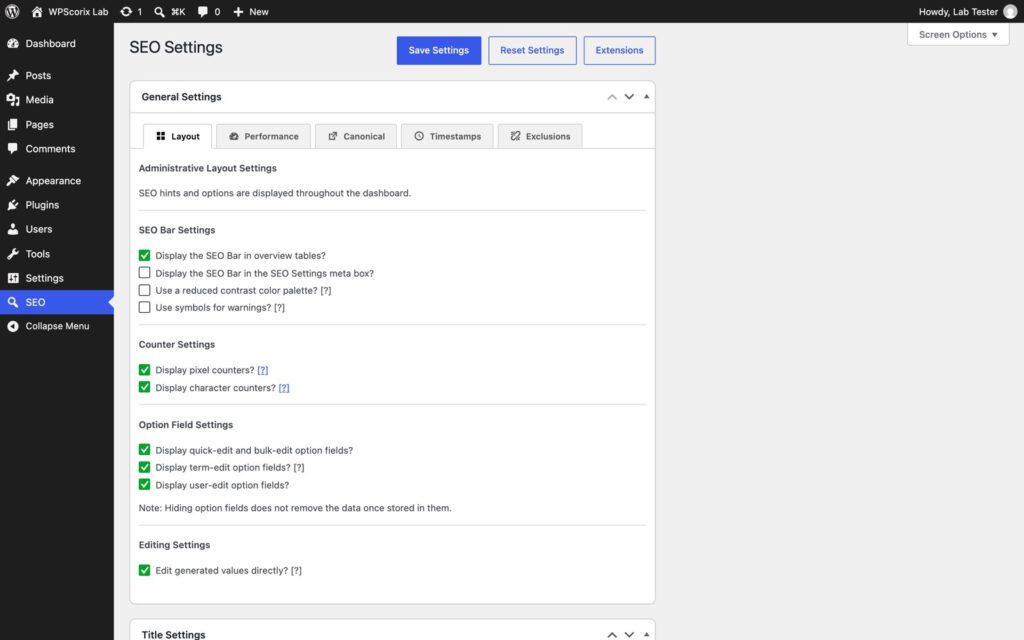
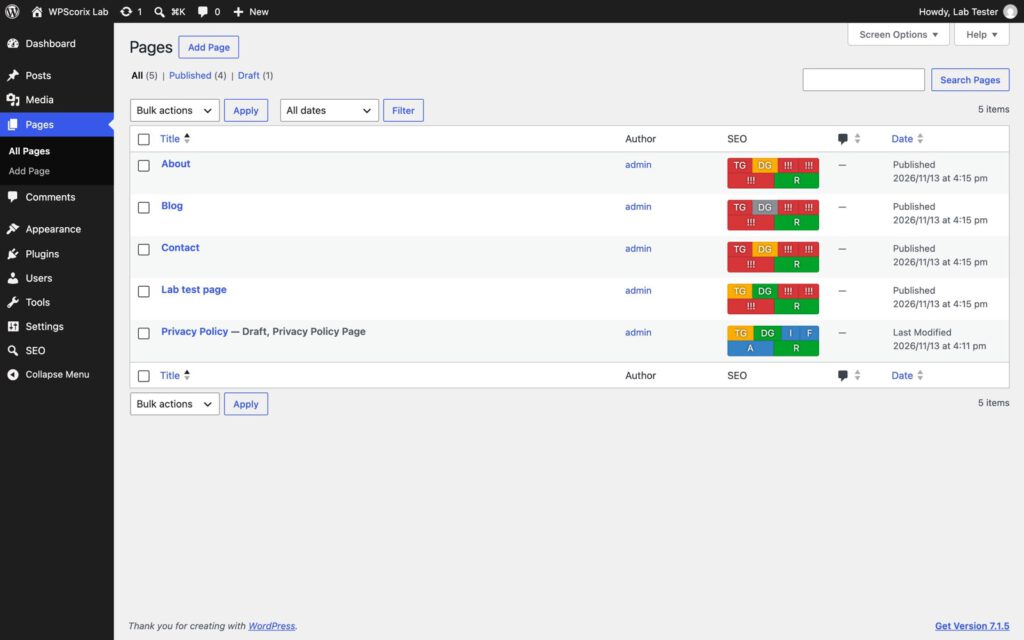
The General Settings screen opened with panels for layout, performance, canonical URLs, timestamps and exclusions. The plugin offers pixel and character counters for titles and descriptions, and an SEO Bar column in the pages list that flags problems per page. On our lab site, which discourages search engines, the bar showed warnings on every page, which is the right behaviour.
Per-page controls
Each post and term gets its own title, description, canonical, social image and robots options, according to the vendor. A per-post 301 redirect field covers single URLs. There is no redirect manager, so bulk redirects or redirects for deleted posts need another plugin such as Redirection.
Extension Manager (paid)
The Extension Manager is a separate plugin. According to the vendor and reviews, paid plans unlock extensions such as Focus (keyword guidance), Local, Articles and Monitor. Sources disagree on which extensions are free, so we do not list them. The Extensions page was not available in our lab because the Extension Manager is not installed, so we did not test any of them.
Setup and ease of use
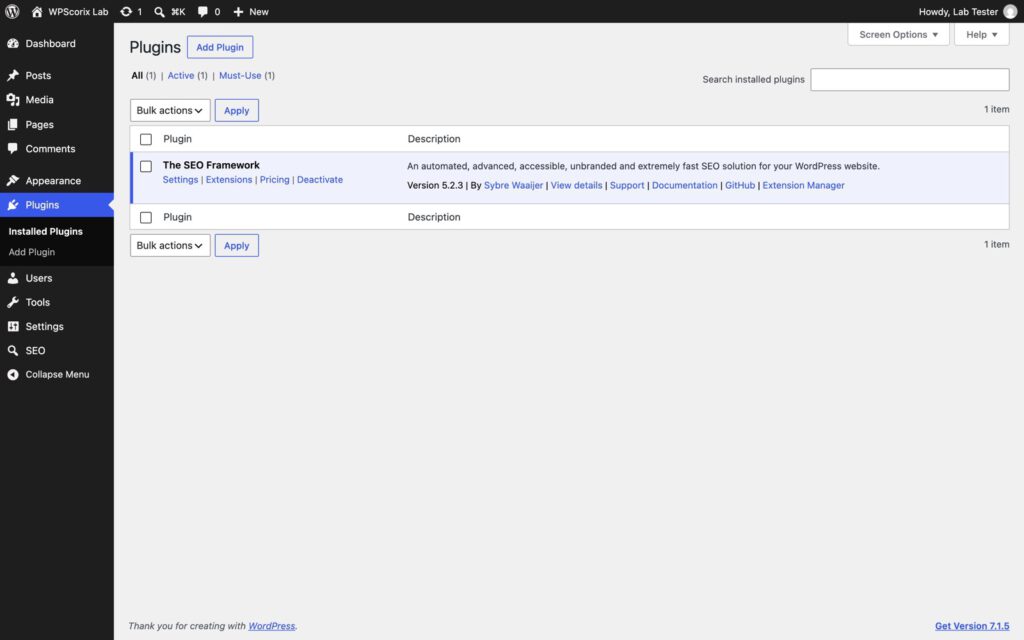
There is no setup wizard. After activation, The SEO Framework added an SEO Settings menu and Settings, Extensions and Pricing links in the plugins list, and started working. We needed no configuration to get from install to a working plugin.
The General Settings screen has collapsible panels and short help links. It is plain and text-heavy, and we saw no wizard on it, so some options may feel technical at first. The big plus is the lack of promotion. We saw no banners, pop-ups or upgrade boxes on the screens we visited. The only upsell we saw is a Pricing link in the plugins list. We did not test the editor sidebar or the per-post box in depth, so the UX / UI score comes from a partial walkthrough.
The SEO Framework screenshots

Performance results
Performance results
| Metric | Without plugin | With plugin | Difference |
|---|---|---|---|
| Time to first byte (median of 3) | 868 ms | 794 ms | −74 ms (−8.5%) |
| Page weight | 232.20 KB | 234.80 KB | +2.60 KB (+1.1%) |
| Front-end CSS/JS files | 4 | 4 | No change |
| DB queries per page | 22 | 22 | No change |
| Peak PHP memory | 44 MB | 40 MB | −4 MB (−9.1%) |
| Autoloaded options | 49.60 KB | 54.90 KB | +5.30 KB (+10.7%) |
| Database tables | 12 | 12 | No change |
| Lighthouse performance score | 97 | 97 | No change |
The SEO Framework added no CSS or JavaScript files to our lab test page, and page weight rose by 2.6 KB. The database query count stayed at 22. Autoloaded options rose by 5.3 KB, and the plugin added no tables or scheduled tasks while active.
Median time to first byte was 794 ms with the plugin and 868 ms without, and peak PHP memory read 40 MB against 44 MB. Both are within the normal run-to-run variation of the lab, so read them as “no measurable slowdown”, not as a speed-up. The Lighthouse performance score was 97 both times.
Compatibility, security and support
Version 5.2.3 requires WordPress 7.0 and PHP 7.4, and is tested up to WordPress 7.1.5, according to WordPress.org. It was last updated on 25 November 2026. We saw no PHP errors in the lab.
WPScan lists 0 vulnerabilities for the plugin, but its page was last updated in May 2025. We found no Patchstack entry. We treat this as no known unpatched issue, checked 27 November 2026.
Deleting the plugin left 5 options behind: its site settings and cache, two database version options and WordPress’s recently activated list. It left no tables or scheduled tasks. The settings stay if you reinstall, but they remain in your database if you don’t.
Support score: based on community data, not our own support test. On the WordPress.org forum, 11 of 14 recent threads were resolved (checked 27 November 2026). Paid plans include private support; free users use the forum. Documentation exists at kb.theseoframework.com. A reader review on G2 praises its simplicity. Forum threads we saw included requests for global redirects.
Pros and cons
Pros and cons
Based on our test of The SEO Framework 5.2.3 in the WPScorix Lab on 27 November 2026.
Pros
- No ads, banners or upgrade pop-ups on the admin screens we visited.
- Added no CSS or JavaScript files and no database queries to our lab test page.
- Worked from defaults with no setup wizard: nothing to configure to get a working plugin.
- Actively maintained: last updated 25 November 2026 and tested up to WordPress 7.1.5.
- Rated 4.9/5 from 382 WordPress.org reviews, with 11 of 14 recent support threads resolved.
- Paid plans start at $84 a year for 2 sites, with a 30-day refund window.
Cons
- No redirect manager: only a per-post 301 field, so bulk redirects need another plugin.
- No readability analysis, and keyword guidance needs the paid Focus extension.
- Left 5 options behind after uninstall, including its site settings.
- Free users get support only on the WordPress.org forum; private support is paid.
- A dense settings screen with no wizard can feel technical to beginners.
Pricing and value
The SEO Framework pricing (regular prices, checked 27 Nov 2026)
| Plan | Price | Best for | |
|---|---|---|---|
The SEO Framework (free) | $0 | Meta, social tags, schema, sitemaps and robots settings | Download free |
| $84 / year, 2 sites | All extensions on 2 sites, 5,000 API requests a month | Get Pro | |
Business | $204 / year, 20 sites | Freelancers, 50,000 API requests a month | See plan |
Agency | $324 / year, 200 sites | Agencies, 500,000 API requests a month | See plan |
The core plugin is free with no limits. Paid plans unlock the Extension Manager’s extensions. Prices come from theseoframework.com and are regular yearly prices.
The Pro plan costs $84 a year for 2 sites. Business costs $204 for 20 sites and Agency $324 for 200 sites. The vendor does not state a separate renewal price on the page we read, so we did not verify one.
TSF’s pricing page promises a full refund of your last transaction within 30 days of purchase or renewal. If you only need clean SEO basics, you don’t need to pay. The paid plans make sense if you want Focus keyword guidance or Local SEO and manage many sites. Check the free version first. If you want redirects and content analysis in one place, Rank Math’s free plugin offers more.
Score breakdown
- Features: 3.0/5. Solid automatic basics, but no free redirect manager, readability analysis or content analysis, and we did not test the paid extensions.
- Performance: 4.0/5. No added front-end files, no extra queries and no tables in our lab.
- UX / UI: 3.5/5. Clean, ad-free admin that works without setup; a dense settings screen and no wizard. Scored from a partial walkthrough.
- Support: 3.5/5. Based on community data, not our own support test. Most forum threads are resolved; private support is paid only.
- Pricing & value: 3.5/5. A capable free plugin; paid plans are cheap per site, but the vendor states no renewal price.
- Security & Maintenance: 3.5/5. Updated on 25 November 2026 and no known vulnerabilities, but settings stay after uninstall.
- Leaving data behind after uninstall takes 0.25 off the overall score.
Top alternatives
Top alternatives
The SEO Framework FAQ
Is The SEO Framework free?
Is the paid version worth it?
Does The SEO Framework slow down WordPress?
Is The SEO Framework safe to use?
Does it have a redirect manager?
Does it leave data behind when deleted?
How does it compare with Yoast SEO and Rank Math?
Bottom line: should you use The SEO Framework?
The SEO Framework scores 3.2 out of 5 in our test. It added no front-end files or database queries in our lab, showed no ads or upgrade boxes on the screens we visited, and worked from defaults with no setup. Support and security data look healthy, though settings stay behind after uninstall.
Choose the free plugin if you run a blog or client sites and want clean SEO basics that stay out of the way. Pay for Pro only if you need extensions such as Focus or Local. If you want redirects and a content score in one free plugin, compare Rank Math (3.2) or Yoast SEO (3.0) first. There is no risk in trying it: the plugin is free, and paid plans have a 30-day refund window.
Review history
- First review draft: lab test of The SEO Framework 5.2.3
Community Reviews
No reviews yet! Be the first to add a review.