


Our verdict
SEOPress is a lean, tidy SEO plugin whose free version covers the basics and adds no front-end files, but it leaves data behind on uninstall and PRO stayed untested.
- Light on the front end: no added CSS or JavaScript files and 1.3 KB more page weight in our test.
- The wizard can import settings from another SEO plugin, so switching is easier.
- Each feature has its own on/off screen, so you can disable what you do not use.
- Deleting it left 1 table and 10 options behind.
- Three stored XSS issues were published in 2026, so you must update promptly.
- A PRO promotion banner appeared on every settings screen we opened.
At a glance
- Developer
- SEOPress
- Category
- Plugins, SEO Plugin
- Version tested / latest
- 10.4 / 10.4
- Last updated
- October 29, 2026
- Active installs
- 300,000+
- WP.org rating
- 4.8/5 (1,270)
- Requirements
- WordPress 6.5 or later, PHP 7.4 or later
- Tested up to
- 7.1.5
- Support resolved (2 months)
- 7 of 7
- First released
- August 22, 2016
- Free version
- Yes
- Renewal
- $49/year
- Refund policy
- No general refund window confirmed on the vendor pages; the vendor terms only show the statutory 14-day French withdrawal right (checked 26 Nov 2026).
- Security
- 3 stored XSS issues published in 2026, all authenticated (Subscriber+) and all outside 10.4: CVE-2026-108041 (analytics tracking settings, versions before 10.4, fixed in 10.4; Threat Radar, 4 Nov 2026). CVE-2026-120515 (analytics affiliate/download tracking settings, up to and including 10.3; two trackers, WP Mayor Plugin Pulse and Polyarix, list it as fixed in 10.4; the official 10.4 release post only mentions 'security hardening' and does not name it). CVE-2026-116535 (display_name via the %%archive_title%% token, CVSS 6.4, published 31 Oct 2026, up to and including 10.3; the 'fixed in' field is blank on the trackers we found, so no vendor-confirmed fix; 10.4 is outside the stated affected range). Patchstack and WPScan entries could not be opened directly (checked 26 Nov 2026). Older: object injection fixed in 7.9, June 2024 (WPScan). None known against 10.4.
By Alex Miller, Plugin Reviewer. Tested 26 November 2026 on SEOPress 10.4 (free) in the WPScorix Lab. Disclosure: WPScorix may earn a commission if you buy through our links. It never changes our scores.
What SEOPress is and who it is for
SEOPress is a WordPress SEO plugin made by SEOPress, a small French company led by founder Benjamin Denis, according to its legal notice. It handles the technical side of SEO: title and meta description templates, XML sitemaps, social tags, breadcrumbs and robots settings.
WordPress.org lists more than 300,000 active installs and a 4.8 out of 5 rating from 1,270 reviews (synced 26 November 2026). Version 10.4 was last updated on 29 October 2026 and needs WordPress 6.5 and PHP 7.4 or later.
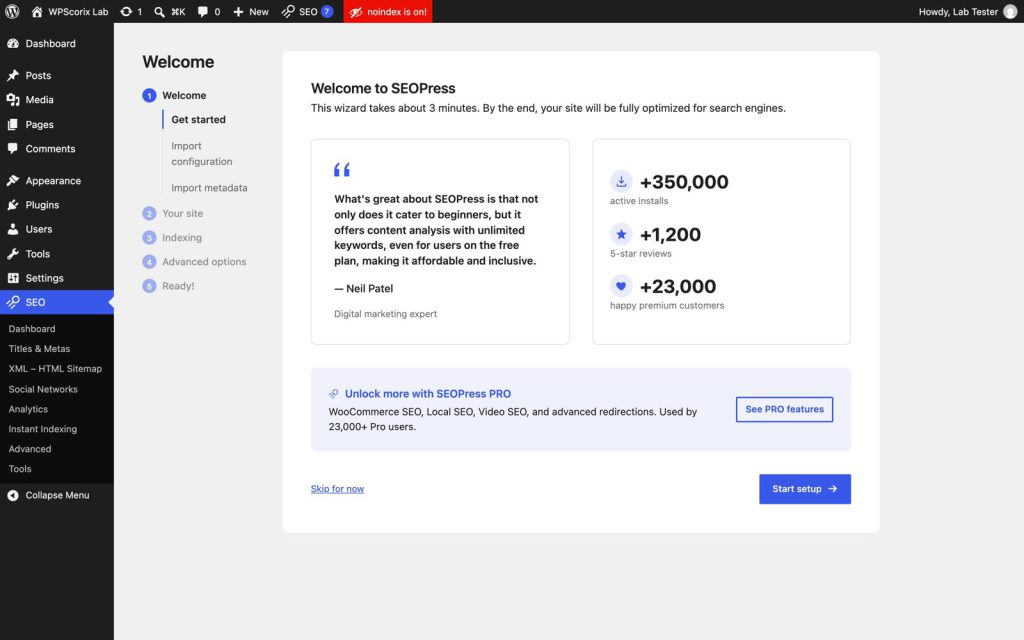
The core plugin is free. SEOPress PRO is the paid version: the vendor lists it from $49 a year for 1 site (seopress.org, checked 26 November 2026). In our lab, SEOPress’s own setup screen names WooCommerce SEO, Local SEO, Video SEO and advanced redirections as PRO features.
In short: it suits freelancers and site owners who want a calm, focused SEO plugin and may add PRO later. It is a weaker fit if you want redirects, more schema types and 404 monitoring in the free version.
How we tested
We tested SEOPress 10.4 (the free version from WordPress.org) on 26 November 2026 in the WPScorix Lab: a clean WordPress 7.1.4 site on PHP 8.3.30 with Twenty Twenty-Five and no other plugins. We measured a test page three times before and three times with the plugin active and report the median. Then we walked through the setup wizard and the admin screens, deleted the plugin and recorded what it left behind. We had no PRO licence, so PRO features are not verified. Read more about how we review and score plugins.
Key features
Feature check
| Feature | Free | Pro | Our result |
|---|---|---|---|
| XML sitemaps (settings checked, output not) | ✓ | ✓ | Partial |
| Meta titles and descriptions (settings checked, output not) | ✓ | ✓ | Partial |
| Open Graph and X tags (settings checked, output not) | ✓ | ✓ | Partial |
| Knowledge Graph and WebSite schema (settings checked, output not) | ✓ | ✓ | Partial |
| Instant indexing (settings checked, output not) | ✓ | ✓ | Partial |
| SEO analysis with unlimited keywords (per SEOPress, not tested) | ✓ | ✓ | Partial |
| Advanced redirections | ✗ | ✓ | Pro only |
| 404 monitor | ✗ | ✓ | Pro only |
| Local SEO | ✗ | ✓ | Pro only |
| WooCommerce SEO | ✗ | ✓ | Pro only |
| Video sitemap | ✗ | ✓ | Pro only |
We went through the admin screens of the free version. We checked that each setting exists and what it offers; we did not check the generated front-end output. Everything about PRO is as the vendor and SEOPress’s own screens describe it, not verified by us.
Titles, meta and social tags
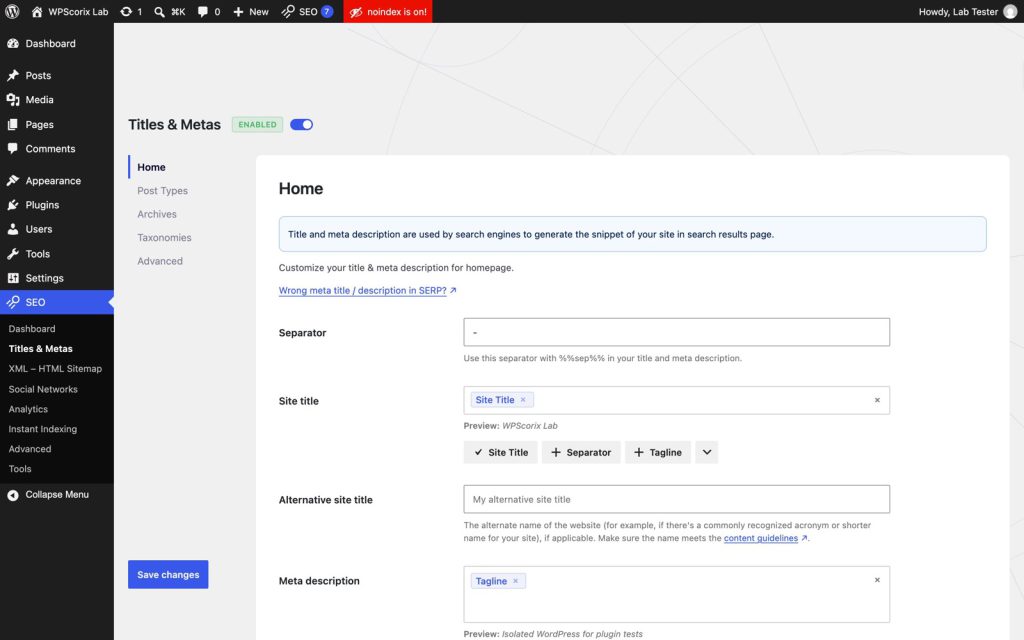
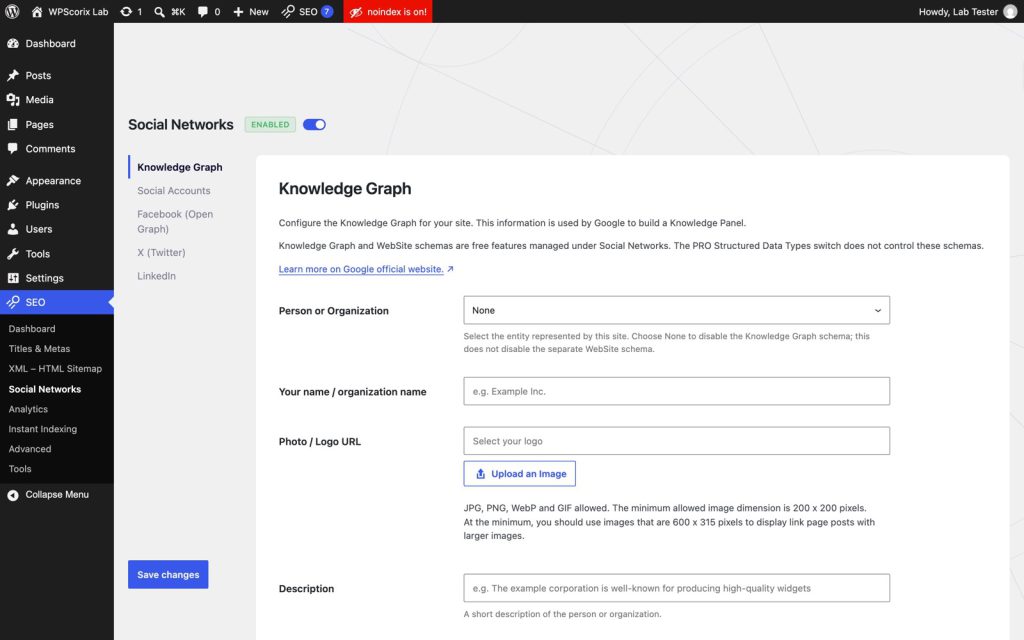
The Titles & Metas screen is enabled by default. It has tabs for the home page, post types, archives, taxonomies and advanced options, with a live preview of the title and a separator setting. A separate Social Networks screen covers Facebook (Open Graph), X (Twitter) and LinkedIn tags.
XML and HTML sitemaps
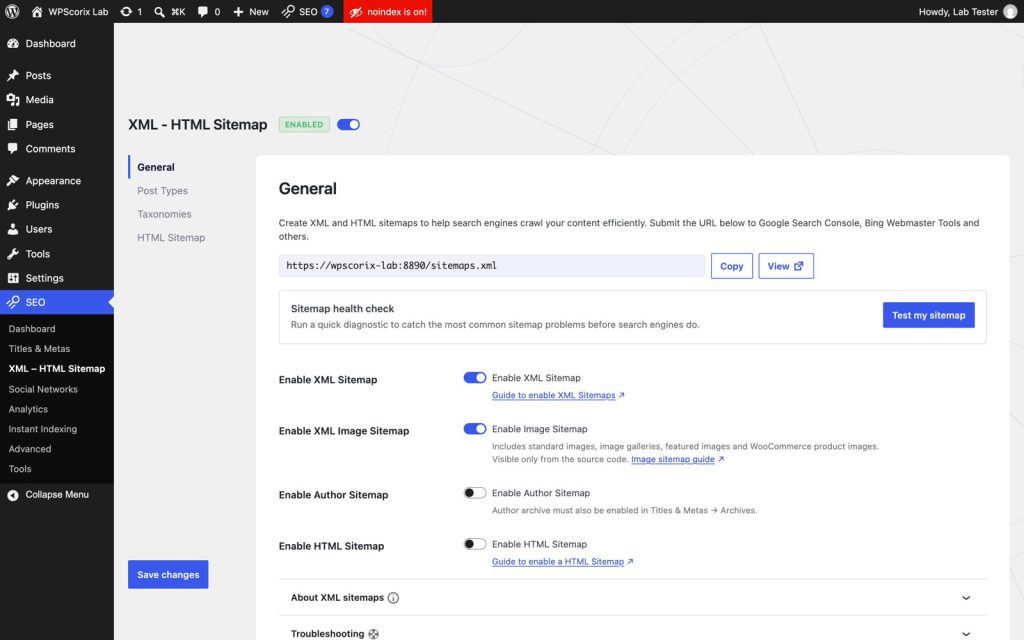
The sitemap screen offers an XML sitemap, an image sitemap and an HTML sitemap, with settings per post type and taxonomy. There is also a “sitemap health check” button that runs a quick diagnostic. Video sitemaps are PRO only, according to SEOPress.
Schema and Knowledge Graph
The free plugin includes Knowledge Graph and WebSite schema, set up under Social Networks. SEOPress says the PRO “Structured Data Types” switch does not control these. Broader automatic and manual schema types are a PRO feature, according to independent reviews.
Instant indexing and editor tools
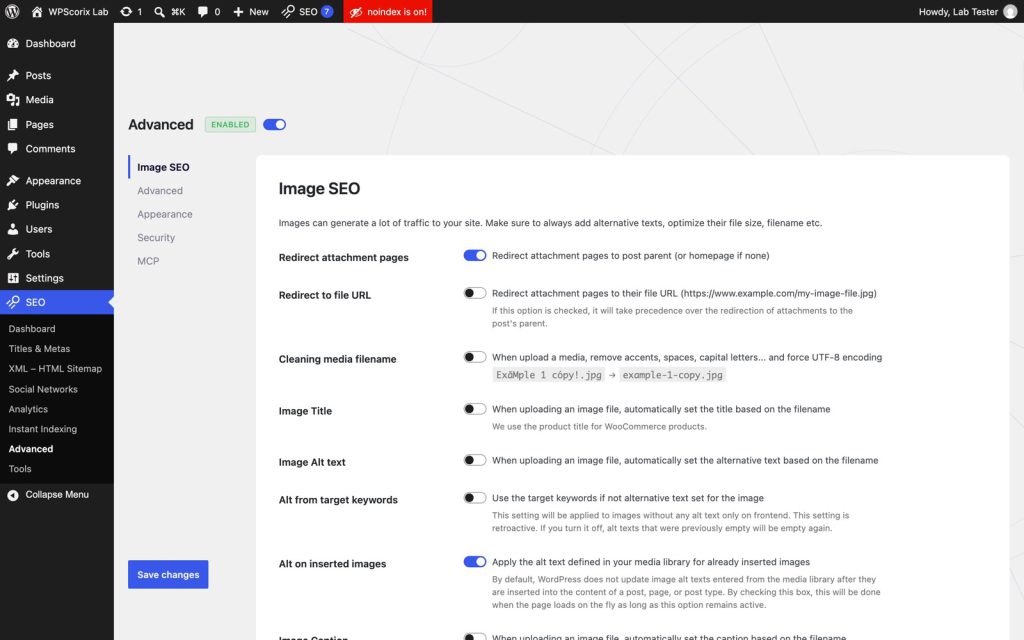
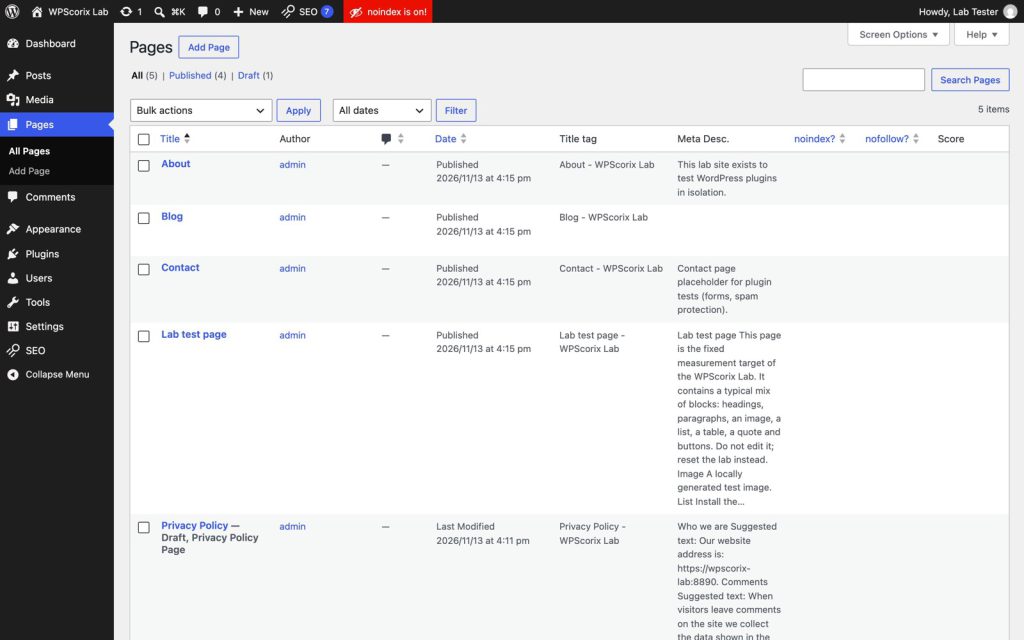
The pages list gets extra columns for the title tag, meta description, noindex, nofollow and a score, plus bulk actions such as “Add to instant indexing queue” and “Enable noindex”. The setup wizard says content analysis with unlimited keywords is included in the free plan. The Advanced screen also has Image SEO options and an MCP tab, for connecting AI assistants.
PRO tools
According to SEOPress, PRO adds WooCommerce SEO, Local SEO, Video SEO and advanced redirections. Independent reviews also list 404 monitoring and AI title generation. We did not test any of these, and reviews disagree about which redirect options the free version keeps.
| Feature | Free | Pro | Our result |
|---|---|---|---|
| XML sitemaps | Yes | Yes | Settings checked, output not |
| Meta titles and descriptions | Yes | Yes | Settings checked, output not |
| Open Graph and X tags | Yes | Yes | Settings checked, output not |
| Knowledge Graph / WebSite schema | Yes | Yes | Settings checked, output not |
| Instant indexing | Yes | Yes | Settings checked, output not |
| SEO analysis, unlimited keywords | Yes | Yes | Per SEOPress, not tested |
| Advanced redirections | No | Yes | PRO only, not verified |
| 404 monitor | No | Yes | PRO only, not verified |
| Local SEO | No | Yes | PRO only, not verified |
| WooCommerce SEO | No | Yes | PRO only, not verified |
| Video sitemap | No | Yes | PRO only, not verified |
Setup and ease of use
After activation, SEOPress opened a setup wizard with 5 steps: Welcome, Your site, Indexing, Advanced options and Ready. It says it takes about 3 minutes. The first step lets you import settings or metadata from another SEO plugin, which helps if you are switching.
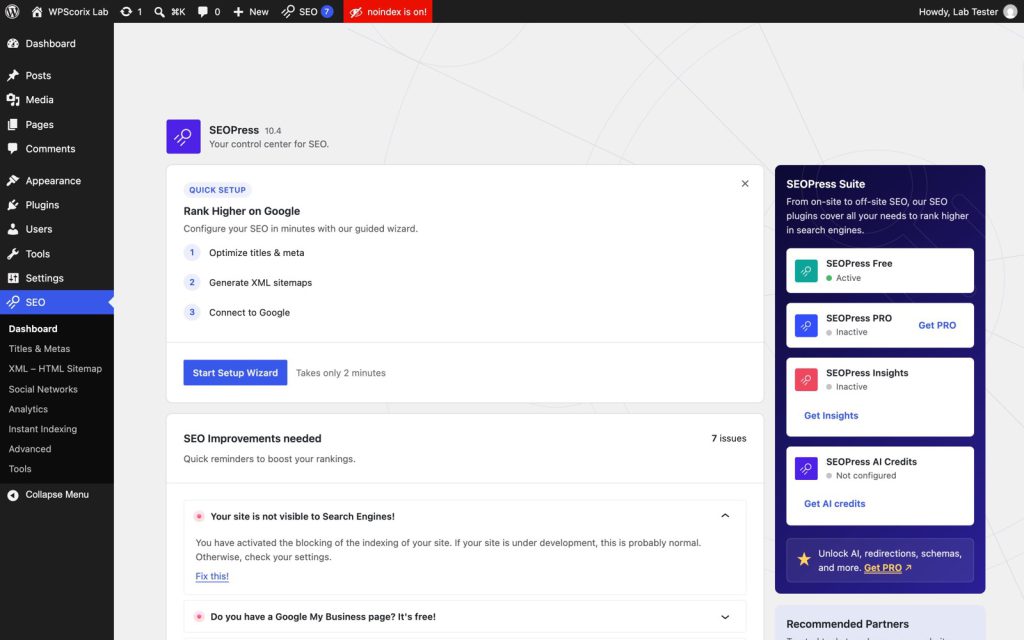
The settings screens are tidy. Each feature has its own screen with an on/off switch, so you can turn off what you do not use. The dashboard lists issues, such as our lab site being set to block search engines, with a “Fix this” link.
The upsells are the drawback. A PRO promotion banner sat at the top of every settings screen we opened, and the wizard shows a PRO box with “23,000+ Pro users”, a company claim we could not verify. The banner does not block anything, but it adds noise.
SEOPress screenshots
Performance results
Performance results
| Metric | Without plugin | With plugin | Difference |
|---|---|---|---|
| Time to first byte (median of 3) | 1,765 ms | 2,199 ms | +434 ms (+24.6%) |
| Page weight | 232.30 KB | 233.60 KB | +1.30 KB (+0.6%) |
| Front-end CSS/JS files | 4 | 4 | No change |
| DB queries per page | 22 | 23 | +1 (+4.5%) |
| Peak PHP memory | 72 MB | 50.50 MB | −21.50 MB (−29.9%) |
| Lighthouse performance score (mobile) | 95 | 94 | −1 (−1.1%) |
| Autoloaded options | 49.70 KB | 53.30 KB | +3.60 KB (+7.2%) |
| Database tables | 12 | 13 | +1 (+8.3%) |
| Metric | Without | With | Unit |
|---|---|---|---|
| Time to first byte (median of 3) | 1,765 | 2,199 | ms |
| Page weight | 232.3 | 233.6 | KB |
| Front-end CSS/JS files | 4 | 4 | files |
| DB queries per page | 22 | 23 | queries |
| Peak PHP memory | 72.0 | 50.5 | MB |
| Lighthouse performance (mobile) | 95 | 94 | score |
| Autoloaded options | 49.7 | 53.3 | KB |
| Database tables | 12 | 13 | tables |
SEOPress added no CSS or JavaScript files to the page and 1 database query. The median time to first byte was 434 ms higher, but the three runs without the plugin alone ranged from 1,590 to 2,304 ms, so treat that gap with caution. Peak memory was lower with the plugin, which is lab variation, not a benefit. While active, it added 3.7 KB of autoloaded options and one table.
Compatibility, security and support
Requirements. WordPress 6.5 or later and PHP 7.4 or later, tested up to WordPress 7.1.5, according to WordPress.org. We saw no conflicts with Twenty Twenty-Five.
Security. Third-party trackers list three stored cross-site scripting (XSS) issues in 2026, all needing a logged-in user. CVE-2026-108041 (analytics tracking settings) was fixed in 10.4. CVE-2026-120515 (more analytics tracking settings) affects versions up to 10.3, and two trackers list it as fixed in 10.4. CVE-2026-116535 (the display name field) also affects versions up to 10.3, but the trackers we found name no fixed version, and the vendor’s 10.4 release post only mentions “security hardening”. 10.4 is outside the affected range of all three. We could not open WPScan or Patchstack entries directly. An older object injection issue was fixed in 7.9 in June 2024, according to WPScan. We found no issue listed against 10.4. Keep the plugin updated.
Uninstall. Deleting the plugin left 1 database table (wp_seopress_content_analysis) and 10 options behind, including settings, install date and database version. That is a deduction in our scoring.
Support (based on community data, not our own support test). On WordPress.org, 7 of 7 support threads were resolved in the last two months, a very small sample. The forum covers the free version. PRO users get email support in English and French, Monday to Friday 9am to 6pm Paris time, according to seopress.org/support. Trustpilot shows about 3.2 out of 5 from 21 reviews, also a small sample.
Pros and cons
Pros and cons
Pros
- Light on the front end: no added CSS or JavaScript files and 1.3 KB more page weight in our test.
- The wizard can import settings from another SEO plugin, so switching is easier.
- Each feature has its own on/off screen, so you can disable what you do not use.
- Unlimited focus keywords in the free plugin, according to SEOPress's wizard.
- Actively maintained: version 10.4 on 29 October 2026, tested up to WordPress 7.1.5.
- Rated 4.8/5 from 1,270 WordPress.org reviews.
Cons
- Deleting it left 1 table and 10 options behind.
- Three stored XSS issues were published in 2026, so you must update promptly.
- A PRO promotion banner appeared on every settings screen we opened.
- Advanced redirections, local, WooCommerce and video SEO need PRO, which we could not test.
- PRO support is email only on weekdays, and Trustpilot sentiment is mixed (about 3.2/5 from 21 reviews).
Pricing and value
SEOPress free and PRO pricing
| Plan | Price | Best for | |
|---|---|---|---|
SEOPress (free) | $0 | Core SEO tools, unlimited sites | Download free on WordPress.org |
| $49 / year | Regular price before VAT (seopress.org, checked 26 November 2026). Renewal is the purchase price. | Get PRO |
A secondary review lists $59 for 5 sites and $149 for unlimited sites, before VAT. We could not confirm those two on the vendor page, so they are Not verified. The vendor’s FAQ says the price you pay at purchase is also your renewal price, and the vendor says it offers no lifetime licences. We could not confirm a general refund window: third-party reviews mention 14 days, but the vendor’s terms we found only cover the statutory 14-day withdrawal right for French consumers.
These are regular prices. The free plugin covers the basics, so you can start free and add PRO only if you need the extra tools.
Score breakdown
- Features: 3.5/5. The free version covers sitemaps, meta, social tags, Knowledge Graph schema and instant indexing, but the extras sit in PRO, which we could not test.
- Performance: 3.5/5. No added front-end files and 1 extra query, with noisy server timings.
- UX / UI: 3.5/5. A short wizard and clear per-feature screens, but a PRO banner on every settings page.
- Support: 3.0/5. Based on community data, not our own support test. Small samples and weekday email support for PRO.
- Pricing and value: 3.5/5. A usable free version and a low entry price at $49 a year, but only one paid price is verified and the refund window is not confirmed.
- Security and Maintenance: 3.0/5. Updated recently and 10.4 is outside the affected range of all three 2026 issues, but there were three XSS issues in the year and one has no named vendor fix.
- Leaving data behind after uninstall takes 0.25 off the overall score.
Top alternatives
SEOPress alternatives
| Plugin | WPScorix score | Best for | |
|---|---|---|---|
| 3.2/5 | Includes redirections and a 404 monitor in its free version. 4M+ installs, rated 4.8/5 from 7,525 reviews. | View | |
| 3.0/5 | The better known option with the largest user base. 10M+ installs, rated 4.8/5 from 27,821 reviews. | View | |
| 2.7/5 | 2M+ installs, rated 4.7/5 from 5,242 reviews. | View |
Rank Math includes redirections and a 404 monitor in its free version. Yoast SEO is the better known option with the largest user base.
SEOPress FAQ
Is SEOPress free?
Is SEOPress PRO worth it?
Does SEOPress slow down WordPress?
Is SEOPress safe to use?
Does SEOPress delete its data when removed?
Can I switch from another SEO plugin?
Bottom line: should you use SEOPress?
SEOPress scores 3.1 out of 5 in our test of the free version. It is light on the front end: it added no CSS or JavaScript files and one database query. The setup wizard takes about 3 minutes, and each feature has its own on/off screen. Against that, it left a table and 10 options behind after uninstall, showed a PRO banner on every settings screen and had three stored XSS issues published in 2026.
Choose the free plugin if you run a blog or small business site and keep plugins updated. Consider PRO, from $49 a year for 1 site, only if you need local, WooCommerce or video SEO. We could not test PRO. If you want redirects and a 404 monitor for free, Rank Math is the alternative. Start with the free version from WordPress.org.
Review history
- First review: tested SEOPress 10.4 (free) on the WPScorix Lab; PRO not verified
Community Reviews
No reviews yet! Be the first to add a review.